
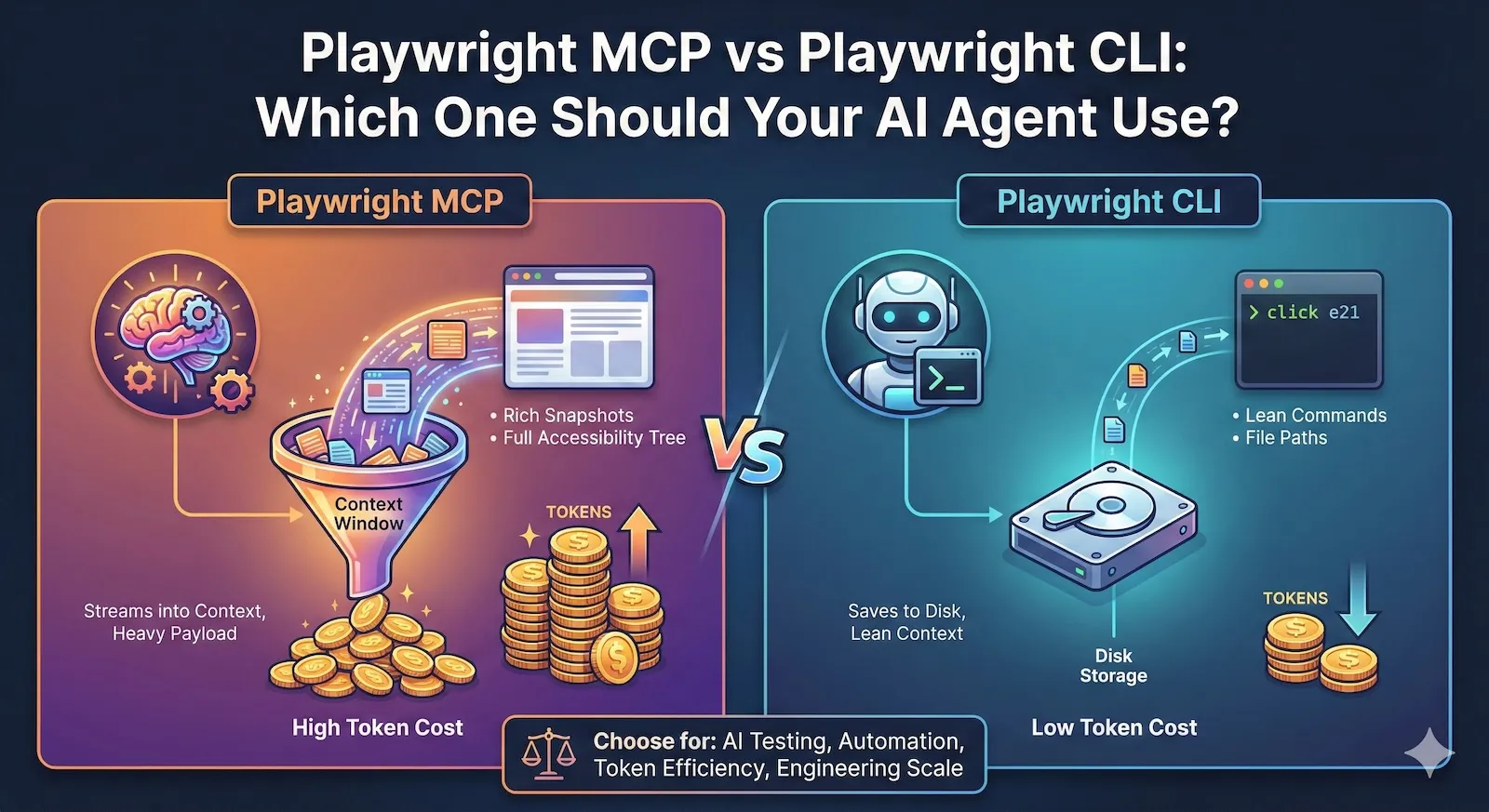
Microsoft now maintains two official packages for AI-driven browser automation:
@playwright/mcp- an MCP server that streams accessibility snapshots and tool schemas directly into your agent's context window@playwright/cli- a shell command interface that saves page state to disk, keeping model context small
Both drive the same Playwright engine underneath. The difference is where the browser state lives: in the model's context window, or on disk.
That difference changes everything about token cost, session length, and what kind of agent loop you can build.
The token gap is not small
Benchmarks from early adopters show 4 to 10x fewer tokens when using CLI compared to MCP for the same automation tasks. One published comparison measured roughly 114,000 tokens with MCP versus 27,000 with CLI on the same flow.
Why? Three reasons:
1. Snapshots go to disk, not into context. When MCP takes a page snapshot, the full accessibility tree lands in the model's conversation history. On complex pages, a single snapshot can range from 50KB to over 500KB. After two or three navigations, you are hitting context limits. CLI saves snapshots as YAML files on disk. The model gets a file path and compact element references like e21, e35. It never sees the raw tree unless it explicitly reads the file.
2. No tool schema overhead. MCP exposes 26+ browser automation tools, each with a full JSON schema. Those schemas are loaded into the model's context at the start of every session. CLI commands are discovered via playwright-cli --help - a few hundred tokens at most.
3. Outputs are compact. An MCP browser_click response includes the updated snapshot, console messages, and structured metadata. A CLI click e21 response is a short confirmation line.
Over a 30-step automation session, these differences compound. MCP sessions routinely overflow context windows. CLI sessions stay lean.
How each approach actually works
Playwright MCP: perception-action loop in context
The agent loop looks like:
- Agent calls
browser_snapshot- gets the full accessibility tree in the response - Agent picks an element by
refattribute - Agent calls
browser_click(orbrowser_type,browser_fill, etc.) - Tool response includes the updated snapshot automatically
- Repeat
The model has rich, structured page awareness at every step. It can reason about what elements exist, their roles, labels, and hierarchy. No vision model needed.
The cost: every step adds a large payload to conversation history. Long sessions degrade as the model loses track of earlier context.
MCP has added incremental snapshot mode (default now) which only sends changes since the last snapshot. This helps, but on pages with significant DOM churn, incremental diffs can still be substantial.
Playwright CLI: state on disk, commands in context
The agent loop looks like:
- Agent runs
playwright-cli open https://example.com - Agent runs
playwright-cli snapshot- snapshot saved to.playwright-cli/directory - Agent reads the snapshot file if needed, finds element refs
- Agent runs
playwright-cli click e21 - Repeat
The model issues small shell commands and gets small responses. Page state is persisted locally via element references that stay valid across commands within a session. The model only pulls in detailed page structure when it needs to reason about it.
The cost: the agent needs filesystem access. It cannot work in a sandboxed environment where file reads and shell execution are blocked.
Pros and cons by scenario
Exploratory automation (unknown UI, adaptive navigation)
MCP wins.
The agent needs to inspect the page at every step, reason about unfamiliar layouts, and decide what to do next based on what it sees. Rich in-context snapshots are exactly what this requires.
CLI can do this too (read the snapshot file, reason, act), but the extra step of "read file from disk" adds friction and the agent has to manage that workflow explicitly.
Long-running test suites and CI
CLI wins.
When you are running 20, 50, or 100 steps in a session, MCP's context accumulation becomes the bottleneck. You either hit token limits, or the model starts hallucinating because it is drowning in old snapshots.
CLI keeps context lean. A 100-step session uses roughly the same per-step token budget as a 5-step session.
Coding agents working with large codebases
CLI wins.
If your agent is also reading source files, editing tests, and managing a codebase, you cannot afford to spend 100K+ tokens on browser state alone. CLI's disk-based approach leaves room for code context.
This is why Microsoft's own README says CLI + SKILLS is "better suited for high-throughput coding agents that must balance browser automation with large codebases, tests, and reasoning within limited context windows."
Sandboxed chat agents (no filesystem, no shell)
MCP wins. It is the only option.
If your agent runs inside Claude Desktop, a browser-based assistant, or any environment without shell access, MCP is how you get browser control. CLI requires npx or a global install and filesystem writes.
Self-healing tests and iterative debugging
MCP has an edge.
When a test step fails and the agent needs to inspect the page, try alternatives, and adapt, having the page state right in context is faster than round-tripping through files. MCP's persistent browser context also means the agent does not need to manage session state explicitly.
That said, CLI supports sessions (-s=name) and persistent profiles (--persistent), so stateful workflows are possible. Just more manual.
Evidence capture and trace generation
Roughly equal, CLI slightly better for standardization.
Both support screenshots, traces, and video. MCP has --save-trace, --save-video, and --save-session. CLI has tracing-start, tracing-stop, video-start, video-stop, screenshot.
CLI's explicit commands make it easier to standardize evidence bundles in CI pipelines because the agent (or your wrapper script) controls exactly what gets captured and where it goes.
The comparison table
| Dimension | Playwright MCP | Playwright CLI |
|---|---|---|
| Token cost per step | High (snapshot + schema) | Low (short command + output) |
| 30-step session budget | 100K-300K+ tokens | 20K-50K tokens |
| Page awareness in context | Full accessibility tree | On-demand (read snapshot file) |
| Filesystem requirement | None | Required |
| Shell access requirement | None | Required |
| Tool discovery | Auto (MCP protocol) | --help or installed SKILLS |
| Session persistence | Built-in (long-lived browser) | Sessions with -s=name |
| Snapshot modes | incremental, full, none | Saved to disk as YAML |
| Video and traces | Config flags | Explicit start/stop commands |
| Headed debugging | --headless flag (headed by default) | --headed flag on open |
| Multi-tab support | Yes (26+ tools) | Yes (tab-new, tab-select, etc.) |
| Network mocking | Via browser_evaluate | route, unroute commands |
| Storage management | --storage-state config | cookie-set, localstorage-set, state-save/load |
| Best for | Exploration, sandboxed agents, short sessions | CI, long sessions, coding agents, scale |
The hybrid pattern
In practice, you do not have to pick one forever. Strong systems often layer both:
- CLI for setup and teardown: open browser, load auth state, navigate to target area, capture baseline
- MCP for the tricky middle: inspect dynamic UI, handle unexpected modals, adapt to layout variations
- CLI for evidence: export trace, take final screenshots, generate summary
This keeps the per-step token cost low for the predictable parts and uses MCP's rich introspection only when the agent genuinely needs to "look around."
Whether you implement this as two separate tools or a single abstraction that switches modes is an architecture decision. The principle is: do not pay for full snapshots on steps where a simple click e21 would do.
What matters more than the interface
Whichever you choose, these reliability concerns dominate both approaches:
Stale references. The page re-renders, refs become invalid. MCP handles this somewhat transparently (new snapshot on every action). CLI requires re-running snapshot to get fresh refs.
Timing. Element exists but is not interactive yet. Both need waiting strategies - MCP has browser_wait_for, CLI has the agent polling with snapshot until the element appears.
Auth drift. Session expires mid-run. Both need auth injection at the browser level (cookies, storage state, headers) rather than having the agent log in.
Bot walls. Neither tool bypasses CAPTCHAs or WAF challenges. That is an infrastructure concern, not a protocol concern.
Context management. Even with CLI's lower token cost, a 200-step session still accumulates conversation history. Summarization, context pruning, or a sliding window strategy matters regardless.
How we think about this at Test-Lab
We built our own agent loop that talks directly to Playwright's browser automation APIs. We did not use Playwright MCP or CLI because our use case is narrow: run QA tests, capture evidence, produce structured reports.
That said, the lessons from the MCP vs CLI comparison apply directly to how we designed our system:
- We are aggressive about what goes into model context. Every token costs money and attention.
- We keep browser state synchronized without flooding the model with raw accessibility trees.
- We save evidence (screenshots, traces) to infrastructure, not to model context.
- We detect when the agent is stuck and intervene, rather than letting it loop through stale snapshots.
The specific mechanisms are our own, but the principle is the same one driving the CLI's design: give the model what it needs to decide, not everything that exists.
The bottom line
If your agent has shell access and you care about cost or session length, start with CLI. It is what Microsoft recommends for coding agents, and the token savings are real.
If your agent is sandboxed or you need rich per-step introspection for exploration, use MCP. Accept the token cost and plan for shorter sessions or context management.
If you are building production automation at scale, you will probably outgrow both and want a custom integration that gives you precise control over what the model sees. That is the path we took at Test-Lab, and it is the path most serious agent builders end up on.
The interface is a means. Reliability and evidence are the outcome.
Want AI browser testing without managing agent infrastructure? Try Test-Lab - we handle the context management, reliability, and evidence capture so you ship tests, not agent plumbing.
Related reading:
- What is Playwright MCP? – a plain-English primer on the protocol
- Chrome DevTools MCP vs Playwright MCP vs CLI – adding Chrome's DevTools MCP autoConnect to the comparison
- Agent-native testing with MCP – how Test-Lab exposes test runs to AI agents and coding tools
- The best AI QA tools in 2026 – an honest, ranked comparison of the wider field