
Something in your account changes, and the first question is always the same: who did that? A test plan that used to pass is paused. A credential was updated last Tuesday. A schedule is suddenly pointed at the wrong environment. On a team, the answer used to be a few Slack messages and a shrug.
test-lab now keeps the answer for you. Every change to your account is recorded in one place, under Settings then Activity, with who made it, where it came from, and exactly what changed. The more people, pipelines, and agents touching your account, the more that one record is worth.
Who, from where, and what changed
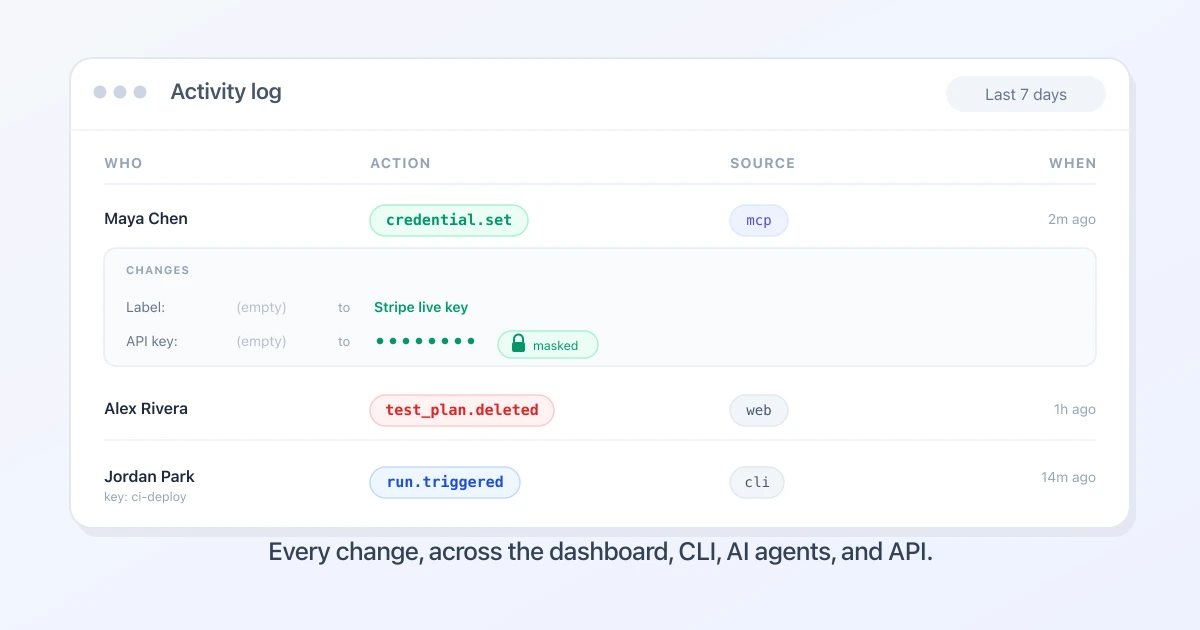
The activity log is a single feed, newest first. Each row is one change, and it tells you four things at a glance: when it happened, who did it, what they did, and which resource it touched.
The action reads in plain terms, like test_plan.deleted, credential.set, or environment.updated, and it is color-coded so a delete in red stands out from a create in green or an edit in blue. The "who" is the person's name when a teammate did it in the dashboard, or the API key's name when an automated job did it. Click a row open and you get the rest: the exact fields that changed, with the old value and the new one side by side.
It covers the things teams actually edit and occasionally break: test plans, projects, schedules, environments, credentials, API keys, data fixtures, labels, integrations, account preferences, saved scripts, team members and invites, and the runs you trigger.
It covers every way into your account, not just the dashboard
This is the part most audit logs miss. They only watch the web UI, so a change made through an API or a script is invisible.
test-lab records changes from every surface and tags each row with its source:
- web, a teammate working in the dashboard
- cli, the testlab CLI in a terminal or a CI job
- mcp, an AI agent like Claude Code driving test-lab over the MCP server
- extension, the Chrome tunnel extension
- api, a direct call to the v1 API
So when a test plan changes, you can tell whether you edited it in the browser, your pipeline updated it over the API, or an AI agent created it through MCP. As more of your testing gets set up by coding agents, knowing which change came from a human and which came from an agent stops being a nice-to-have.
See the exact before and after
A line that says "test plan updated" is not much help on its own. Updated how?
Every edit stores a field-level diff. Open the row and you see each field that moved, the previous value struck through, the new value next to it. Renamed a project, changed a proxy country, flipped a schedule from active to paused: it is all there in the terms the dashboard uses, not raw database columns.
Saved scripts get the same treatment, as actual code. When you upload a new version of a script or the AI refines one, the row carries a +/- diff of the lines that changed, with the count added and removed, so you can read the edit without leaving the page.
Credentials stay masked
An audit log that leaks secrets is worse than no audit log. test-lab built this the way it handles authentication everywhere else: your secrets never appear in plaintext.
Credentials show up only as a masked preview, enough to confirm which value changed, never the value itself. Anything that looks like a secret, a token, a password, a webhook URL, or a session cookie, is redacted before the entry is written, including secret-named fields buried inside a larger object. Your test data fixtures, by contrast, are recorded in full, because that is test input, not a secret store.
This is the part a security team cares about most. You get a complete, reviewable history of who touched a credential and when, without that history becoming a second place those secrets can leak from.
Filter down to the change you are looking for
The feed is searchable by the three questions you usually arrive with. Filter by resource type to see only credentials or only schedules. Filter by source to see only what came in over the API. Filter by time, from the last 24 hours out to all time. The default view is the last seven days, which is most "wait, what changed?" moments.
Built for teams and organizations
On a solo account, the log is your own history, handy for retracing your steps. On an organization, it becomes something more valuable: a shared, append-only record of the changes your team makes across the account.
That is where it earns its keep. When a passing suite suddenly fails, you can see in seconds whether someone changed the test plan, the environment, or a credential, and exactly who. When a teammate joins or leaves, you have a clean change history for the access review. When a customer's security team sends over a vendor questionnaire, the audit trail they ask about already exists.
It also settles the question that gets louder as a team grows and more of its testing is wired up by pipelines and AI agents: of all the changes flowing into this account, which came from a person, which from automation, and who is accountable for each.
Because that history names your teammates and shows what they changed, it is governed like the rest of your account. The activity log is visible to organization owners and admins only. Members do not see it, and both the page and its data are enforced on the server, not just hidden in the UI. When test-lab support acts on your account with your permission, those actions are recorded too, but kept out of your team's feed, so what you see is your people, not ours.
Try it
Open Settings, then Activity. You will see the changes from the last week already there, every one tagged with who, from where, and what moved. Filter by a credential or a schedule you have been wondering about, and click a row open to see the before and after.
The changes were always happening. Now you can see them.