
You searched "AI test automation tools" because you need a testing platform. Not because you want to read another blog post.
So let's skip the part where we explain what test automation is and get to what you actually need: which tool fits your team, your budget, and your workflow. We've used or evaluated all six platforms covered here. Some are great. Some are great for specific situations. Some have pricing that will make your eyes water.
Here's what we found.
What "AI-powered" actually means in testing
The term gets thrown around loosely. Three distinct capabilities matter, and not every tool has all three.
Self-healing tests adjust selectors and locators when UI elements change. This is table stakes in 2026. Most serious testing tools offer it. The quality varies, though. Some handle minor CSS changes fine but break on layout redesigns. Others use visual AI to locate elements even after significant restructuring.
AI-assisted test creation means you describe what to test in natural language rather than writing scripts. The range here is wide. Some tools use AI to suggest test steps that you refine manually. Others generate and execute complete test flows from a single sentence.
Intelligent test analysis uses AI to identify which tests to run based on code changes, flag flaky tests before they waste CI time, and suggest new test cases based on application behavior. This is the newest category and still maturing.
When a vendor says "AI-powered testing," ask which of these three they mean. The answer tells you a lot about the product.
The tools
Testim (by Tricentis)
Best for: Enterprise QA teams with existing Tricentis infrastructure.
Testim combines a visual test recorder with an AI stability engine. You record browser interactions, then AI makes the tests more resilient to UI changes. Deep integration with the Tricentis suite is a real advantage if you're already in that ecosystem. It's also real lock-in if you're not.
The test recorder is polished. The AI stability layer handles minor UI changes well. Enterprise features like role-based access, audit logging, and parallel execution at scale are mature. If you have a dedicated QA team that knows test automation, Testim gives them powerful tools.
Where it falls short: test creation still requires someone comfortable with low-code tooling. When the recorder doesn't capture a flow correctly (SPAs, dynamic content, complex multi-step workflows), you're editing JavaScript snippets. The "AI" label mostly applies to maintenance, not creation. And pricing is enterprise-only. Expect a sales call, not a pricing page.
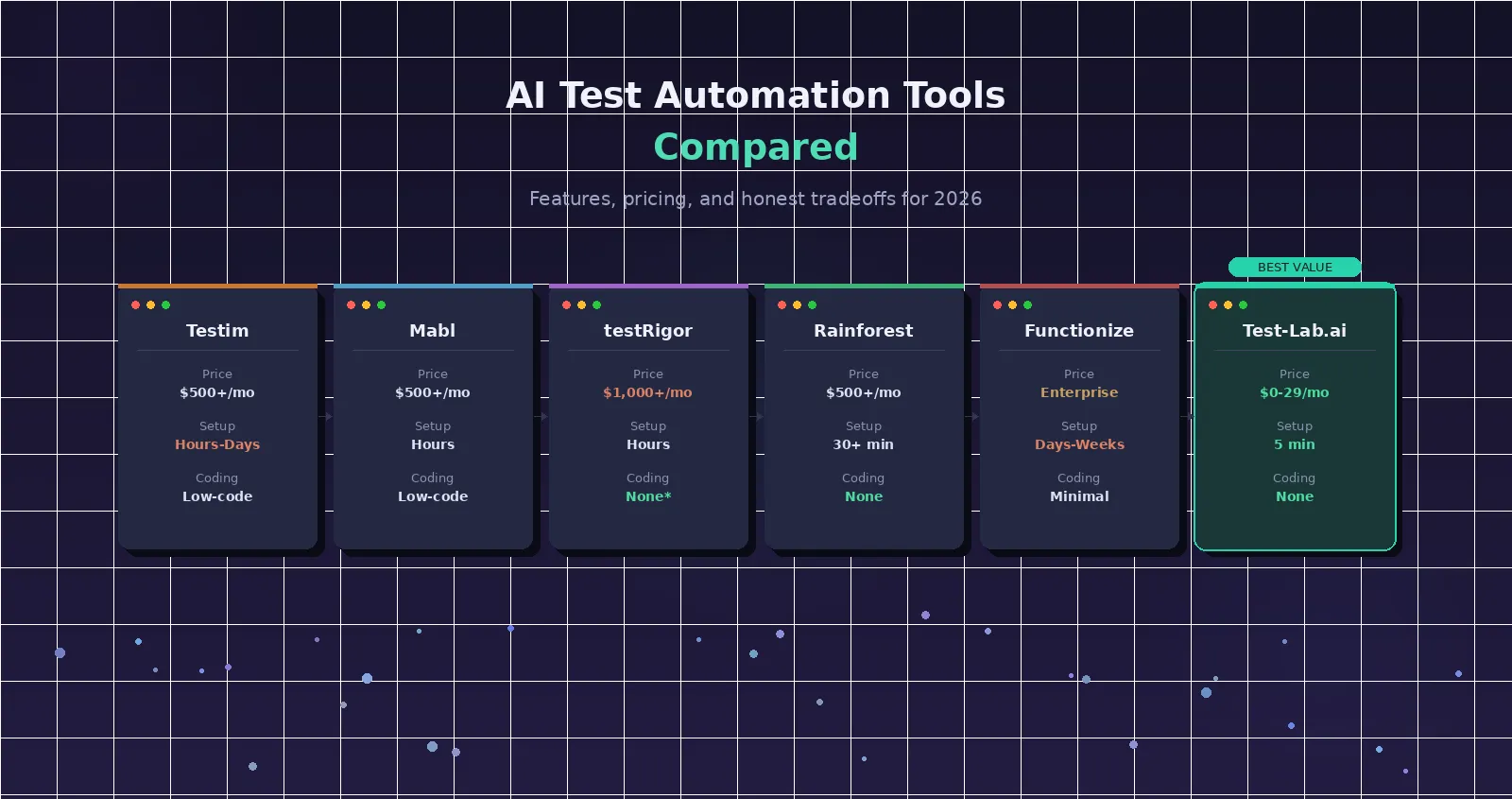
Pricing: Enterprise only. No self-serve plans. Expect $500+/month minimum. Setup time: Hours to days, depending on your CI/CD infrastructure. Coding required: Low-code with JavaScript fallback.
Mabl
Best for: DevOps teams that want testing integrated into their deployment pipeline.
Mabl offers auto-healing tests, visual regression testing, API testing, and performance monitoring in one platform. The integration story is the strongest selling point. Mabl connects natively to most CI/CD systems, issue trackers, and communication tools.
The unified platform approach means you're not stitching together multiple tools. Auto-healing is solid for incremental UI changes. API testing capabilities are a genuine differentiator. Most competitors focus exclusively on UI testing. The insights dashboard surfaces useful patterns about test reliability over time.
Where it falls short: creating tests still relies on a visual recorder with a learning curve. Complex flows require significant manual configuration. The platform is designed for teams with QA expertise. If you're a developer trying to add testing without a QA background, the onboarding is steep.
Pricing: Starts around $500/month. Custom enterprise pricing for larger teams. Setup time: Hours for basic setup. Days for full CI/CD integration. Coding required: Low-code. Some scripting for advanced scenarios.
testRigor
Best for: QA teams that want to write tests in plain English without any code.
testRigor's differentiator is genuinely natural language test creation. You write steps like "click on the Login button" and "check that the page contains Welcome back." The platform executes them. This isn't AI-assisted recording. It's direct natural language interpretation.
The natural language approach is real, not marketing. Non-technical team members can write and maintain tests. Coverage across web, mobile (native and hybrid), and API testing is broader than most competitors. The platform handles 2FA, email verification flows, and cross-browser testing.
Where it falls short: the natural language has its own syntax and conventions to learn. It's simpler than code, but it's not truly "just write what you want." Complex test logic (conditional flows, data-driven testing with many variations) can feel awkward in the constrained English syntax. And the pricing is premium.
Pricing: Starting around $1,000+/month. Setup time: Hours. Plain-English approach reduces initial test creation time. Coding required: None for standard flows. Some learning of testRigor's specific syntax.
Rainforest QA
Best for: Teams that want no-code testing with crowd-sourced human validation.
Rainforest takes a unique approach. AI-powered testing combined with on-demand human testers who validate results. You create tests with a visual, no-code editor. Rainforest runs them on real browsers. When a test failure is ambiguous, a human reviewer checks it before flagging it as a bug.
The human-in-the-loop approach virtually eliminates false positives. That's a big deal if you've been burned by flaky test suites generating noise. The no-code editor is genuinely accessible to non-technical users.
Where it falls short: test execution is slower than fully automated alternatives because of the human validation step. Costs scale with test volume more aggressively than software-only tools. The hybrid model means you depend partly on crowd-sourced tester availability. If you need sub-minute feedback loops on every commit, the execution speed won't fit.
Pricing: Starts around $500+/month. Scales with test volume. Setup time: 30+ minutes for initial setup. Coding required: None.
Functionize
Best for: Enterprise teams looking for comprehensive AI-native testing.
Functionize uses ML models trained on millions of test executions to create, maintain, and analyze tests. NLP-based test creation, visual testing, and predictive analytics about where bugs are likely to occur based on code change patterns.
The ML approach genuinely improves over time as it learns your application's patterns. Predictive analytics can surface issues before they become test failures. The platform handles complex enterprise applications with heavy DOM manipulation well.
Where it falls short: the ML models need training data. The platform takes weeks to months to reach full effectiveness on a new application. This isn't a tool you set up Monday and get value from Tuesday. Enterprise-only pricing and sales-driven onboarding create a high barrier. Overkill for small teams or straightforward applications.
Pricing: Enterprise only. Custom pricing via sales. Setup time: Days to weeks for initial setup. Weeks to months for ML model training. Coding required: Minimal, but requires understanding the platform's concepts.
Test-Lab.ai
Best for: Developers, solo founders, and small teams who want AI testing without setup overhead.
We built Test-Lab differently from the tools above. Instead of recording browser interactions or writing tests in a constrained syntax, you describe what you want to test in plain English. An autonomous AI agent executes the test like a real user would. No recorder to learn. No syntax to memorize. No selectors to maintain.
The zero-setup promise is real. You can run your first meaningful test within minutes of signing up. Describe a flow like "go to my-app.com, log in with test credentials, navigate to the dashboard, and verify the chart loads" and the agent handles the rest. Self-healing is built into the approach. Because the agent navigates by understanding the UI, not by matching selectors, it naturally adapts to layout changes. CI/CD integration is a single YAML step. Pricing starts at $0/month with pay-as-you-go credits, or $29/month for BYOK Pro.
Where it falls short: currently web-only. No native mobile app testing, though mobile browser emulation is supported. The AI agent approach means test execution takes longer than selector-based tools (2-5 minutes for quick mode, 5-10 for deep mode). For very large test suites with hundreds of tests, the per-test model may cost more than flat-rate enterprise tools. The product is newer and less battle-tested at enterprise scale than Testim or Mabl.
Pricing: Pay-as-you-go ($0/month base) or $29/month for BYOK Pro. Custom enterprise plans available. Setup time: 5 minutes for CI/CD integration. Coding required: None. Ever.
Side-by-side comparison
| Feature | Testim | Mabl | testRigor | Rainforest QA | Functionize | Test-Lab.ai |
|---|---|---|---|---|---|---|
| Test creation | Recorder + code | Recorder | Plain English (own syntax) | Visual editor | NLP + ML | Plain English (free-form) |
| Coding required | Some (JS) | Some | None (syntax to learn) | None | Minimal | None |
| Self-healing | Yes | Yes | Yes | N/A (human review) | Yes | Yes (AI-native) |
| Mobile testing | Web + mobile | Web + API | Web + mobile + API | Web | Web + mobile | Web + mobile emulation |
| CI/CD setup | Hours | Hours | Hours | 30+ min | Days | 5 minutes |
| Starting price | ~$500+/mo | ~$500/mo | ~$1,000+/mo | ~$500+/mo | Enterprise | $0 (pay-as-you-go) |
| Best for | Enterprise QA | DevOps teams | QA teams | Quality-first teams | Large enterprise | Devs and small teams |
| Time to first test | Hours | Hours | ~1 hour | ~30 min | Days-weeks | Minutes |
The real cost: beyond the monthly bill
Monthly subscription cost is only part of the equation. Total cost of ownership includes setup, ongoing maintenance, and the engineering hours spent keeping tests healthy.
Teams spend 60-80% of their automation effort on maintenance. Not writing new tests. Not catching regressions. Just keeping existing tests alive while the UI evolves underneath them. This is where self-healing and AI-native approaches pay for themselves. If a tool reduces maintenance from 20 hours/week to 2 hours/week, that's 18 hours of engineering time recovered regardless of the subscription cost.
Here's a rough total cost comparison for a team running 50 E2E tests on a typical SaaS application:
| Cost factor | Enterprise tools (Testim/Mabl) | Mid-range (testRigor/Rainforest) | Test-Lab.ai |
|---|---|---|---|
| Monthly platform cost | $500-2,000 | $500-1,000 | $0-29 |
| Setup engineering time | 20-40 hours | 10-20 hours | 1-2 hours |
| Weekly maintenance hours | 5-10 hrs | 3-5 hrs | ~1 hr (AI-native) |
| Time to first useful test | 1-5 days | 2-8 hours | 5-15 minutes |
| Annual effective cost (est.) | $20,000-50,000 | $10,000-25,000 | $350-5,000 |
These numbers vary based on application complexity, team size, and testing volume. But the order-of-magnitude differences are consistent.
How to choose
The "best" tool depends entirely on your context.
Enterprise platform (Testim, Mabl, Functionize) if you have a dedicated QA team, an established testing practice, and budget for $500+/month tooling. These offer depth, compliance features, and organizational controls that large teams need.
testRigor if you want natural language testing and have the budget for premium pricing. The plain-English approach is the most mature among established players, and cross-platform coverage is broader than most.
Rainforest QA if false positives are your biggest pain point. If flaky automated tests have been crying wolf, the human validation layer solves that specific problem better than any purely automated tool.
Test-Lab.ai if you're a developer, founder, or small team that needs testing without the overhead of learning a new platform. Describe a test in one sentence, get results in minutes, no $500/month bill. See how we compare to every tool above.
Try it yourself
The most useful thing you can do is run the same test scenario across 2-3 platforms. Pick a real user flow from your application. Something with login, navigation, and a data verification step. See how each tool handles it.
You can run your first test here in under two minutes. Describe what you want to test and watch the AI agent execute it live. No signup required for the first five demo runs. When you're ready to integrate into your workflow, check our pricing. Pay-as-you-go starts at $0/month.
Want to go deeper? Read how self-healing tests cut maintenance by 95%, how to set up multi-step test pipelines, or how AI test plan analysis optimizes your suite for cost and speed. You can also check our getting started docs to see how Test-Lab.ai works in practice.