
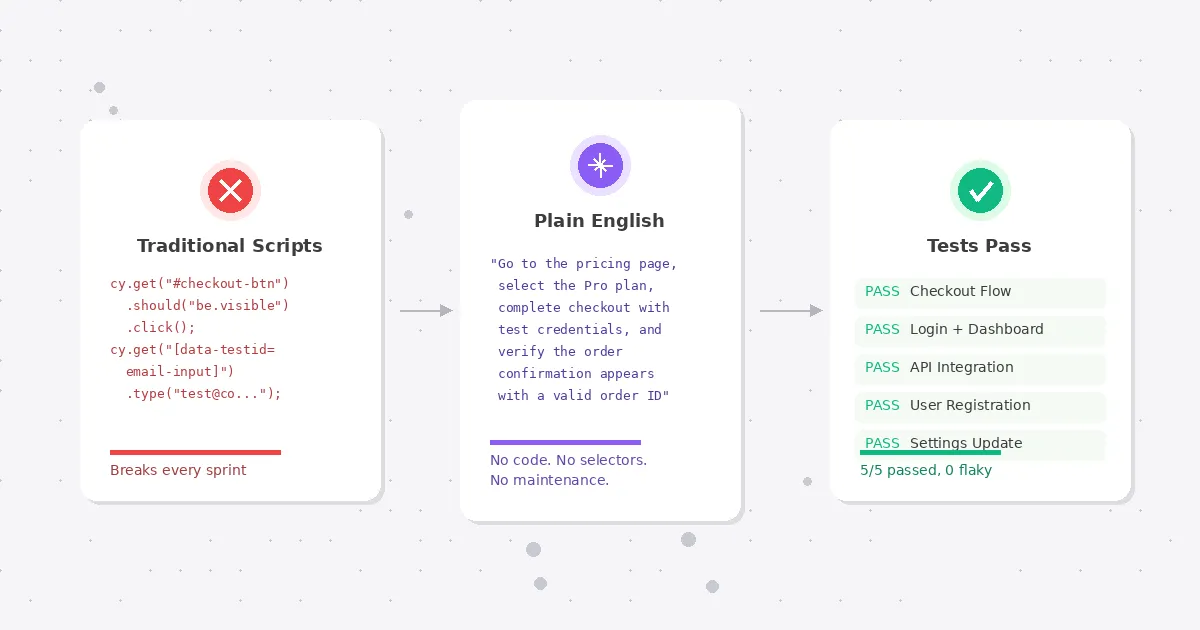
You hired developers to build your product. They are spending 30% of their time writing and fixing test scripts instead.
This is the test automation trap. You invest in automation to move faster, then the automation itself becomes the bottleneck. Selenium scripts that break every sprint. Cypress tests that need constant selector updates. A test suite that takes more engineering hours to maintain than it saves.
No-code test automation exists because this math stopped making sense. And in 2026, the tools have gotten good enough that "no-code" no longer means "no capability."
What no-code test automation actually means
The label gets applied to very different things. Three categories exist, and they solve different problems.
Record-and-replay tools watch you click through your app and generate test scripts from those actions. Selenium IDE popularized this approach back in 2006. Modern versions from tools like Testim and Mabl add AI-powered healing so the recorded tests survive minor UI changes. You still need someone who understands test design. The tool handles the scripting part, not the thinking part.
Structured natural language tools let you write test steps in a constrained English syntax. testRigor is the most established here. You write "click on Login" and "check that page contains Welcome back" and the platform interprets it. The syntax feels natural but has rules. You will spend time learning what phrasing the tool understands and what it rejects. It is simpler than code, but it is not free-form.
AI agent-based tools take a plain English description of what to test and figure out the rest autonomously. No recording. No syntax to learn. You describe the intent ("log in, go to dashboard, verify the revenue chart loads with data"), and an AI agent opens a real browser and executes it like a human would. This is the newest category and the one changing the fastest.
All three qualify as "no-code." The difference is how much structure and test design knowledge they still require from you.
Why this matters now more than it did two years ago
Two things changed.
First, AI models got dramatically better at understanding UI. In 2024, AI-driven test execution was a demo. In 2026, it is production infrastructure. The models can read a page, identify interactive elements, handle dynamic content, and recover from unexpected states. Self-healing went from a feature checkbox to a genuine engineering capability.
Second, the developer shortage got worse. Most engineering teams are understaffed relative to their roadmaps, and that gap keeps widening. QA is the first thing that gets deprioritized when you are short on people. No-code test automation lets you maintain coverage without dedicating scarce engineering time to test infrastructure.
The combination means that no-code is not a compromise anymore. For many teams, especially those under 50 engineers, it is the only realistic path to consistent test coverage.
What good no-code testing looks like in practice
Abstract comparisons are only useful up to a point. Here is what a real testing workflow looks like with each approach, using a common scenario: testing a SaaS checkout flow.
Record-and-replay approach
- A QA engineer or developer opens the app in the recorder
- They click through the full checkout flow manually
- The tool generates a test from those clicks (usually 15-30 steps for a checkout flow)
- They add assertions manually ("verify order confirmation page appears")
- They configure test data (test credit card numbers, addresses)
- They debug the first run because the recorder missed a loading state or dynamic element
- They run the test in CI. It works for two weeks, then breaks when the checkout form gets a redesign
- They re-record or patch the broken selectors
Total setup: 2-4 hours. Monthly maintenance: 1-3 hours per test, depending on how fast the UI changes.
Natural language approach
- A team member writes steps in the tool's syntax:
- "go to pricing page"
- "click on Pro plan"
- "fill billing form with test data"
- "click Complete Purchase"
- "verify confirmation page shows order ID"
- They configure test data in the platform's variable system
- They debug syntax issues (the tool did not understand "fill billing form" and needs more specific field instructions)
- The test runs. Maintenance is lower than record-and-replay because there are no selectors, but the natural language steps still need updating when the flow changes significantly
Total setup: 1-2 hours. Monthly maintenance: 30 minutes to 1 hour per test.
AI agent approach
- A team member writes a test plan: "Go to the pricing page, select the Pro plan, complete checkout with test credentials, and verify the order confirmation appears with a valid order ID"
- The AI agent executes it. No recording. No syntax rules. No selector configuration
- The agent handles loading states, dynamic content, and minor UI variations automatically
- When the checkout flow gets redesigned, the test still passes because it was never tied to specific elements
Total setup: 5-15 minutes. Monthly maintenance: near zero for UI changes. You update the test plan only when the actual business flow changes.
The time differences compound. A team with 50 E2E tests spends very different amounts of time depending on the approach:
| Record-and-replay | Natural language | AI agent | |
|---|---|---|---|
| Initial setup (50 tests) | 100-200 hours | 50-100 hours | 4-12 hours |
| Monthly maintenance | 50-150 hours | 25-50 hours | 2-5 hours |
| Skill required | QA/dev | QA with some training | Anyone who can describe user flows |
| Resilience to UI changes | Low | Medium | High |
Common misconceptions about no-code test automation
A few beliefs keep teams from trying no-code testing. Most of them are outdated.
"No-code means no control." This was true five years ago. Early no-code tools gave you a visual recorder and nothing else. If the recorder got something wrong, you had no way to fix it without dropping into code. Modern no-code test automation platforms give you full control over test logic, assertions, data inputs, and execution order. You just express that control in English instead of JavaScript.
"It only works for simple flows." Record-and-replay tools did struggle with complexity. Multi-step wizards, authentication redirects, dynamic content, iframes. AI agent-based tools handle these because they interact with the page the way a human would. They read the screen, figure out what to click, and adapt when something unexpected appears. We regularly see Test-Lab users testing OAuth login flows, multi-step checkout processes, and admin dashboards with role-based access. These are not simple flows.
"Real engineers write code." This one is cultural, not technical. Writing Cypress tests does not make you a better engineer. Shipping reliable software does. If a tool lets your team maintain 200 E2E tests with 5 hours of maintenance per month instead of 50, that is not laziness. That is good engineering. The time you get back goes toward building features, not babysitting selectors.
"You will outgrow it." Maybe. If you are running 10,000 tests across a distributed microservices architecture with custom test infrastructure, you probably need something purpose-built. But that describes maybe 2% of software teams. The other 98% will never hit the ceiling of a good no-code test automation platform.
The tradeoffs nobody talks about
No-code test automation is not universally better. A few things are genuinely harder without code.
Complex data-driven testing. If you need to run the same test with 500 different input combinations, code-based frameworks handle this natively with parameterized tests and data fixtures. No-code tools are catching up (most support CSV imports and variable systems), but the experience is clunkier.
Custom integrations. Hitting a specific API endpoint before a test, seeding a database, or validating something in a backend system requires scripting in most no-code tools. Some handle it with built-in API steps. Others make you drop down to code for anything beyond the browser.
Execution speed. AI agent-based tools are slower per test than selector-based automation. A Cypress test that takes 30 seconds might take 2-5 minutes with an AI agent. For a small suite this does not matter. For 500 tests running on every commit, it adds up. Test plan analysis helps here by identifying which tests can run in quick mode vs. deep mode, but the speed gap is real.
Debugging precision. When a coded test fails on line 47 with a specific assertion error, you know exactly what went wrong. When an AI agent test fails, you get screenshots and step logs, which are often more useful for understanding the actual bug, but less precise for debugging the test itself.
These tradeoffs are not dealbreakers for most teams. But they are worth knowing about before you commit to a platform.
Which no-code test automation approach fits your team
The "right" approach depends on where you are right now.
Solo founders and indie hackers. You have no dedicated QA. You probably test by clicking through the app before each deploy, or you skip testing entirely and hope for the best. AI agent-based no-code test automation is the obvious fit. Write a few test plans describing your critical flows, run them on deploy, and catch regressions before your users do. Total investment: an hour to set up, then minutes per week.
Small teams (2-15 engineers). You might have one person who owns QA part-time. Record-and-replay could work if that person has testing experience, but the maintenance burden will eat their time as the product grows. Natural language or AI agent tools give you better leverage. The team member who knows the product best can write tests regardless of their coding background.
Mid-size teams (15-50 engineers). You probably have a few dedicated QA people and an existing test suite that is either thriving or slowly dying under maintenance debt. No-code test automation works well as a complement here. Use it for new feature coverage and regression testing while your existing coded tests handle the data-heavy and integration-heavy scenarios. The two approaches are not mutually exclusive.
Larger teams (50+ engineers). You likely have established test infrastructure. The question is not "should we use no-code" but "where does no-code save us time." Smoke tests, release verification, and cross-browser checks are common entry points. Teams at this scale often start with no-code for a specific use case and expand from there.
How to evaluate no-code tools (without getting sold)
Every vendor in this space will give you a polished demo. The demo always works. Here is how to test whether the tool works for your application, not their demo app.
Run your hardest flow first. Do not start with the login page. Pick the flow that has broken the most tests in your existing suite. Multi-step forms, dynamic content, third-party embeds, authentication redirects. If the tool handles your worst case, it will handle the rest.
Check maintenance after two weeks. The real test of any automation tool is not day one. It is day 14, after two deployments changed the UI and a new feature shipped. Did the tests survive? How many needed manual intervention?
Ask about CI/CD integration complexity. "We integrate with CI" can mean a single YAML line or a two-day setup project. Ask to see the actual configuration. If it takes more than 30 minutes to add to your pipeline, that is a signal.
Test with your actual team. If the pitch is "anyone can write tests," have someone from product or customer support try it. Not with a tutorial. With your real application. See how far they get without help.
Look at the failure reports. When a test fails, what do you get? A cryptic error message? A screenshot of the failure state? A full step-by-step replay with timestamps? The quality of failure reporting determines whether your team can actually act on test results or just gets noise.
What we built at Test-Lab
We took the AI agent approach because we kept watching the same pattern play out. A team would invest months building a test suite with traditional tools. The suite would work great for a few weeks. Then maintenance would eat the team alive, and they would stop writing new tests because they were too busy fixing old ones.
Test-Lab uses an autonomous AI agent that executes tests in a real browser. You describe what to test in plain English. The agent handles navigation, interaction, assertions, and evidence capture. No selectors, no recording, no syntax.
When things break, you get screenshots at every step, a full execution log, and a clear explanation of what went wrong. When things change in the UI, the test keeps working because it was never locked onto specific elements. Self-healing is built into the architecture, not bolted on as an afterthought.
You can schedule tests to run automatically on whatever cadence makes sense. Nightly regression suites, hourly health checks, post-deploy verification. AI test plan analysis reviews your plans and suggests optimizations to reduce cost and execution time.
Setup takes minutes. Add one step to your CI pipeline and you are running AI-powered E2E tests on every deployment. Pricing starts at $0/month with pay-as-you-go, or $29/month for BYOK Pro. No enterprise sales call required.
Getting started without the commitment
If you have been burned by test automation tools that promised the world and delivered a maintenance burden, skepticism is healthy. Here is a low-risk way to try no-code testing:
- Pick one critical user flow that you currently test manually or not at all
- Describe it in a few sentences (e.g., "sign up for an account, verify the welcome email link works, and confirm the onboarding wizard loads")
- Run it through a no-code tool and see what you get
You can run your first test on Test-Lab in under two minutes. No signup for the first five demo runs. See how the AI agent handles your application, not a curated demo environment.
If it works, add it to your CI pipeline. If it does not, you spent two minutes finding out.
Read more: How self-healing tests cut maintenance by 95% · Optimize your test suite with AI analysis · Set up scheduled test runs · Compare AI testing tools